

Docs ComplyPress — Cookie Notice & Policy Banner for WordPress
Policy link per language
The policy button can follow the visitor’s language. How you set that up depends on the link type on Buttons.
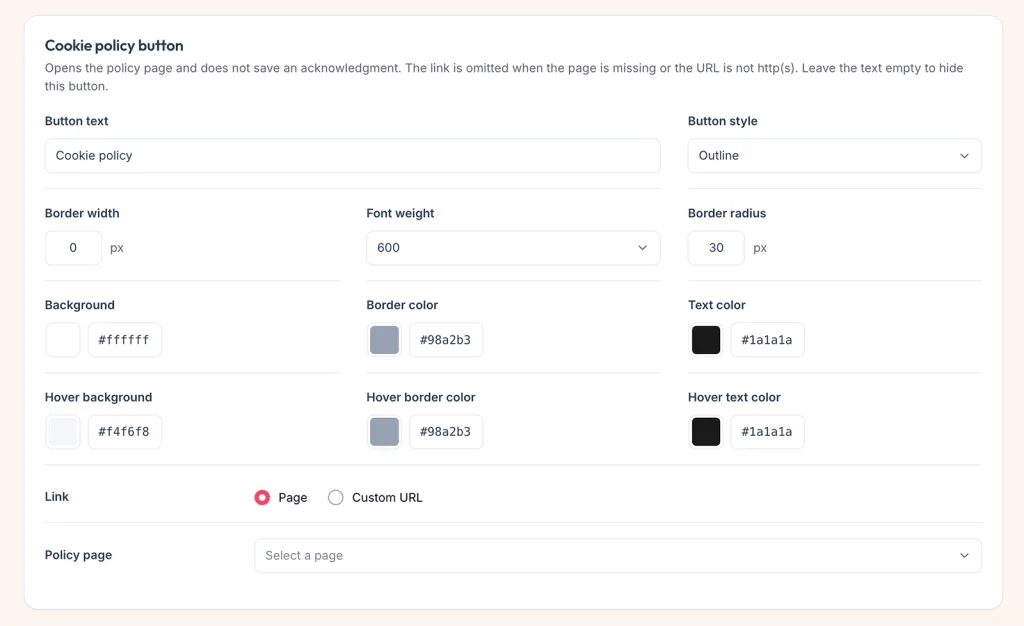
WordPress page
- On CTA Buttons, set Link to Page.
- Select the policy page. That page should already have a translation in Polylang or WPML.
- Save.
On the front end, the button opens the translation of that page for the language the visitor is viewing. If that language has no translation, WordPress uses the original page.
Custom URL
- On CTA Buttons, set Link to Custom URL.
- Enter the source URL and save. ComplyPress registers
policy_url. - Translate that string in Polylang (
complypress_policy_url) or WPML (policy_urlin thecomplypressdomain).
Each language can then point at a different address. The button is omitted if the URL for that language is empty or is not http or https.
Still have questions?
Send us a message from the contact page and we will reply by email.