

Docs ComplyPress — Cookie Notice & Policy Banner for WordPress
Export, import, and uninstall
Use Settings to copy your configuration to another site, or to remove ComplyPress data when you delete the plugin.
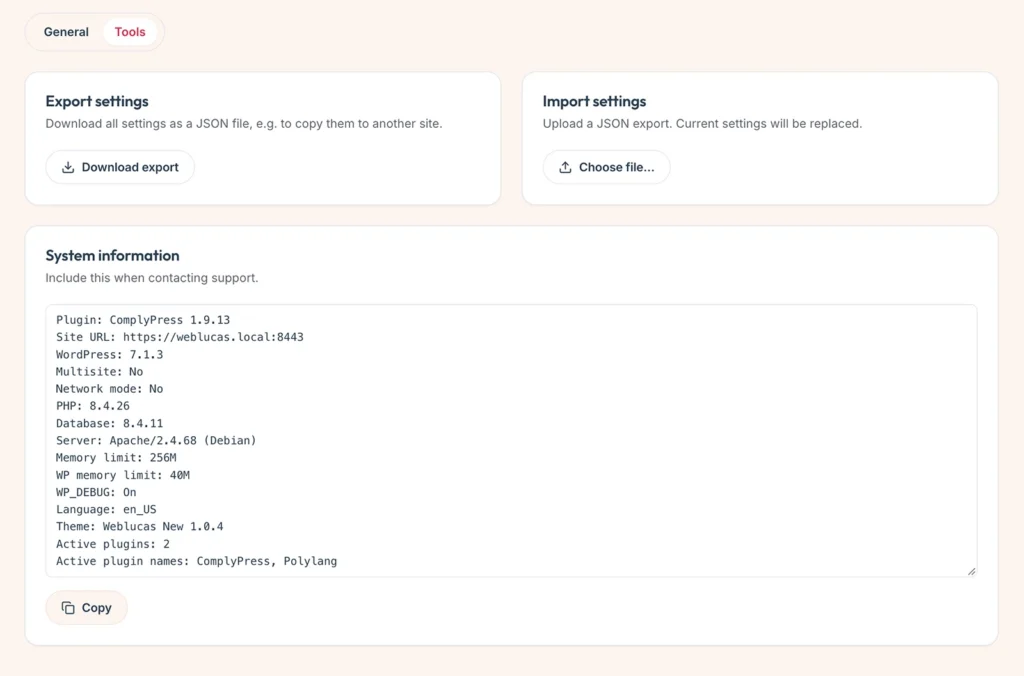
Open Settings
- Go to Settings → ComplyPress → Settings.
- General holds uninstall and reset.
- Tools holds export, import, and system information.
Export
- Open Tools.
- Under Export settings, download the JSON file.
- Keep that file. It contains every ComplyPress setting.
Import
- Open Tools on the site that should receive the settings.
- Under Import settings, choose the JSON file.
- Confirm the prompt. Current settings on that site are replaced.
Import accepts a settings JSON file up to 1 MB. A file that is not a ComplyPress settings export is rejected.
System information
The System information box on Tools lists environment details you can copy when you contact support.
Delete data on uninstall
- Open General.
- Turn on Delete data if you want all plugin settings removed when the plugin is deleted from WordPress.
- Leave it off to keep settings in the database after you delete the plugin files.
- Click Save changes.
Deactivating the plugin does not delete settings. Only deleting the plugin, with this option on, removes them.
Still have questions?
Send us a message from the contact page and we will reply by email.